

In July 2024, I reported on this in the German M365 News Show. Unfortunately, it still contained errors. I reported these to the Microsoft OneDrive group in Redmond. Then the sharing was withdrawn. And it took quite some time, but now the new sharing with expiration date has been published again:
Anyone

Nothing has changed here. The administrator can specify a time limit for the anonymous link (can be forwarded) for the entire tenant (max. 730 days), which the user can only shorten and not extend. After the time has expired, the link becomes ineffective. So if anonymous sharing is allowed, then a short time should be preset. I recommend 80 days. However, anonymous sharing is unsafe for administrators because the link can be forwarded. And therefore often not allowed.
The administrators wanted the same logic for links within their own organization and for external sharing with external people who cannot forward the link.
And Microsoft has now complied with this request.
People in your own organization
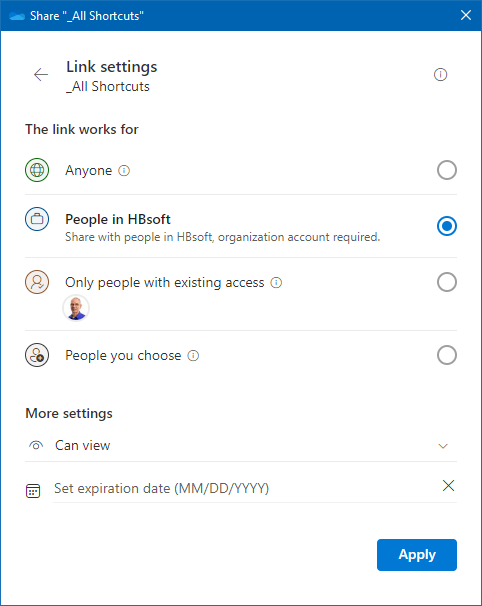
The user can now also enter an expiration date here, but this is not yet pre-assigned when it is called up.
People with existing access
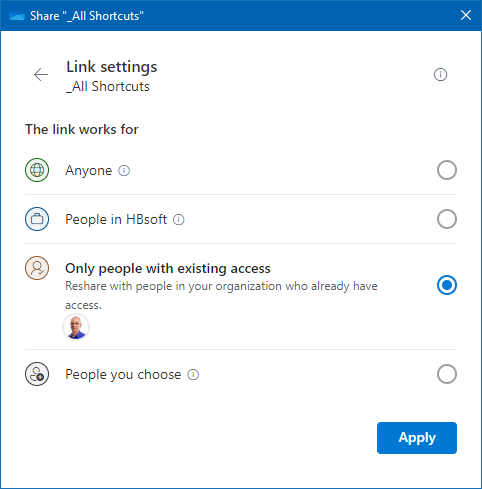
There is no option to enter an expiration date here.
People you choose
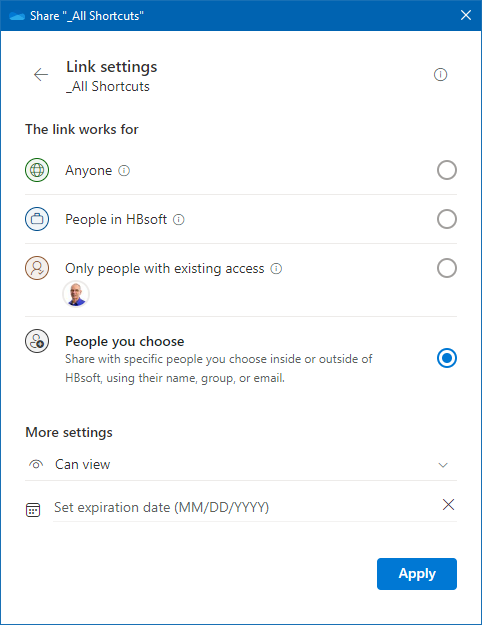
And here is the option to send an external user a link with an expiration date to a file or folder. This user can forward the link, but the selected recipient will not be able to access it.
Criticism
The expiration date when sharing within the organization and when sharing with external persons should also contain a date by the administrator (as with sharing with everyone).
User training is appropriate and for the user it is only a minimum of 2 clicks. This limits the open links to OneDrive and SharePoint to a minimum.
There is still a flaw, but I have informed those responsible in Redmond about it.
Entdecke mehr von Hans Brender's Blog
Melde dich für ein Abonnement an, um die neuesten Beiträge per E-Mail zu erhalten.

 Hans Brender's Blog