

I have written about it. And have spoken about on the past Events also . And now I have found a description about the the process: How OneDrive for Business sync works
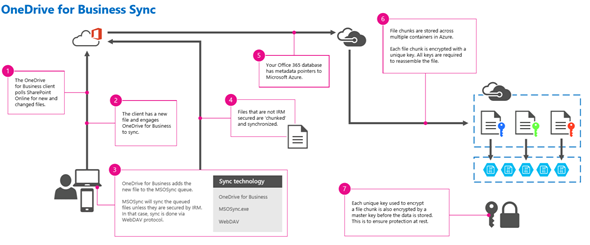
| 1 | The OneDrive for Business Client checks in intervals on SharePoint if there are new or changed files |
| 2 | If you save a file in the OneDrive for Business folder, the sync-process will start |
| 3 | OneDrive for Business adds the new file to the MSOSync-queue. There is a logic implemented, if this file is IRM protected. About IRM I have written some articles here and here. If the logic found an IRM File, sync is done via WebDAV protocol, otherwise the sync process will start with MSOSync. |
| 4 | Files, not IRM protected will chunked in fragments and sync to SharePoint Online. |
| 5 | In Office 365only some metadata pointers will stored, the pointers show to SQL Azure. |
| 6 | The content fragments are stored in Azure Stores, each store will encrypted with a separate key. This procedure I Have also documented here. Microsoft called this “Fort Knox” or official Advanced File Encryption |
the following Web services will be used for sync:
| Cellstorage.svc | used for file synchronization. |
| Sites.asmx | returns site collection information. |
| Webs.asmx | used to work with sites and webs. |
| Lists.asmx | used to work with lists and list data. |
| Version.asmx | used to work with file versions, |
Remember: This is done only for SharePoint Online, not for SharePoint Server 2013 (onPrem).
Entdecke mehr von Hans Brender's Blog
Melde dich für ein Abonnement an, um die neuesten Beiträge per E-Mail zu erhalten.

 Hans Brender's Blog
QUITE helpful and informative at the moment – some mysteries in the behaviour of this are now resolved 🙂 Thanks a lot 🙂
LikeLike