
History
To describe this process, we need to go back in time:
Tenant description
With OneDrive Insider version 26.025.0208.0001, administrators gained access for the first time to a new group policy called Set a custom name for the OneDrive folder.
Background information: When a new OneDrive version is automatically updated to a higher version (currently approx. 570 MB), regardless of Insider/Production/Delayed, you also receive the current group policies for OneDrive. I currently provide all available OneDrive versions here, but I personally do not install them automatically. However, I have written a PowerShell script that compares the old and new OneDrive admx files binarily and then sounds an alarm if there is a discrepancy.
So on February 8, 2026, there was a new group policy. On February 20, 2026, Microsoft created an entry with roadmap ID 557562 with a rollout date of April 2026.
IT admins can now customize the local OneDrive sync root folder name on users‘ Windows computers. By default, the folder is named „OneDrive – {organization name},“ which can consume valuable path length for deeply nested files and folders. With this new policy, admins can set a shorter, organization-specific folder name — reducing path length issues and giving users a cleaner file system experience.
Sounds good, but… We need to look to the past
Small and medium-sized companies have provided information when setting up a Microsoft 365 tenant for their company:
Example:
ePA4Y Unternehmensgesellschaft (haftungsbeschränkt)
would have been sufficient:
ePA4Y
The long name in the above example, which is legally correct, is then used throughout SharePoint and OneDrive, as well as Windows. And depending on the operating system, there are length restrictions.
Many companies have been reluctant to prepare their data stored on file servers for migration to the cloud. For example, distributing the files across multiple SharePoint Online servers. And then they reached the limit of 300,000 files. Distributed across OneDrive for Business and SharePoint separately.
And then came the idea of OneDrive shortcuts. Jeff Teper talked about “Add to OneDrive”, which was actually correct, but ultimately ended up as “Add Shortcut to OneDrive”.
For many employees who were (incorrectly) trained, OneDrive for Business was “my desktop” and all SharePoint data was “shared.”
Over time, the Microsoft OneDrive product group made many improvements, from colored folders to working in the browser (also to circumvent synchronization with more than 300,000 files), but people love their Explorer, which has also been enhanced. Perhaps this love also stems from the fact that there are still programs for Windows that are not from Microsoft.
The software limit of 300,000 files for classic synchronization will not change. But synchronization with shortcuts will. In November 2025, Microsoft launched a private preview where up to 500,000 files could be synchronized.
What I’m trying to say is: The future belongs to synchronization with the shortcut method
I have pointed this out in many articles, but in many companies the effort involved cannot be ignored. Because there can only be one synchronization. The old one must be dissolved. And the possible group policies for synchronization do not work with the shortcut method.
And if you want to go down that route, administrators should introduce the shortcut method for people who are new to the company.
Then, in mid-March/late April 2025, the new naming conventions for folder shortcuts were introduced. The issue is visible in Explorer on the left-hand side. The name is truncated.
The next Step
To resolve this, Microsoft is introducing a new group policy.
This setting allows IT administrators to customize the local OneDrive sync root name used on the disk. Shortening the folder name can help minimize path length issues for end users. Note that this change will not take effect for users who are already syncing files. Note that this change will not take effect for users who are already syncing files. For more information on how to deploy this change for users who are already syncing files, see the following article.
This is somewhat misleading. Since we synchronize OneDrive for Business and Shortcuts, this is somewhat problematic. This is because when the group policy is implemented by the administration, the user is not aware of it.
The order should be as follows:
- Synchronization already exists, then search for unlink
- Now the administration can implement the group policy
- Then restart synchronization (link)
Or
- Synchronization does not exist
- Roll out the group policies
- Then start synchronization (initial synchronization)
None of this is ideal. But when it finally gets going, it will be worth it. Yes, you gain 46 characters (in our example above). So it makes sense.
For the end user (who has no idea that the administration has rolled out a new group policy), the short version that they are unfamiliar with now appears when they save. And then?
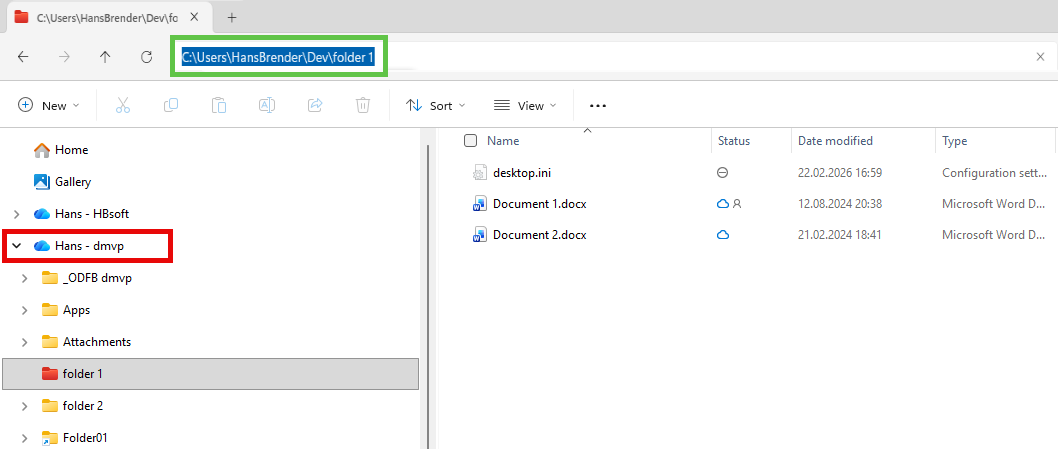
It is always a challenge to show an illustration that cannot show everything because I myself do not have a tenant that is excessively long. Sorry.
So, the tenant has the name dmvp, which I renamed with the group policy (and also shortened to Dev). So we still see the old name in the red square on the left, and only when we click on the line above is the short form displayed (green square). It appears in other places as well, but without communication with the administration, this is confusing for the user.
I asked Microsoft…
Why don’t you put the shortened name on the left side of the Explorer where the user can see it? Users won’t understand why they have to remember the long version.
Summary:
A lot of communication is necessary. Users are confronted with an abbreviation (different name), which requires additional training.
The purpose of this matter must be to
- Avoid the mistakes of the past
- Establish “Add 2 OneDrive” as the default synchronization.
Entdecke mehr von Hans Brender's Blog
Melde dich für ein Abonnement an, um die neuesten Beiträge per E-Mail zu erhalten.

 Hans Brender's Blog
Ein Gedanke zu “New GPO: Set a custom name for the OneDrive folder”