

Error Description
Open file and select a different folder within the dialog. Or save a file and choose a different folder. If it is a cloud synchronized area (OneDrive), the status icons will not be displayed correctly.
Error occurs on Windows 10. Error occurs in OneDrive for Business and OneDrive Personal (Consumer)
If I save a newly created file and want to change the location while doing so, a DLL file is used, which is also used by other program manufacturers. I tried that to exclude Office as an offender. And while selecting, all displayed directories and / or files are always in synchronization status. No matter which version of Windows I try. Everyone has the same result. With one exception: Windows 10 Insider with build number 18945.
| Picture | Description |
 |
That’s the way it should look like (And that’s what it looks like in the Windows Insider version.) Image was created with the Windows Insider Version 18945. |
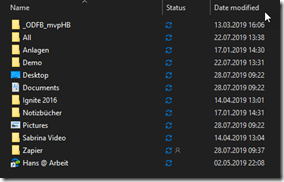 |
And that is the representation with all other Windows 10 versions, if the dialogue with "save as" is displayed. All folders and files are displayed with the sync status, which is definitely wrong. |
Microsoft was informed about the bug. The bug was fixed in the Windows 10 version 18876. (which most will not receive)
Here again must be explained why users who do not have an insider version have to wait until the next half-year cycle (Windows 10 version 1909). When Microsoft releases its cumulative updates for the current production and enterprise rings, they also need to be reviewed. On dependencies with many other programs. Some of the fixes make it into an update, others do not. This is not so important, and only occurs when opening and saving when we are looking for a file on the hard drive or Save.
Entdecke mehr von Hans Brender's Blog
Melde dich für ein Abonnement an, um die neuesten Beiträge per E-Mail zu erhalten.

 Hans Brender's Blog