

In mid-June 2018, I wrote about the new Group Policy and Definitions for OneDrive. I also reported on the missing documentation at Microsoft. This is especially about the group policy
Require users to confirm large delete operations
This group policy prevents users from "accidentally" deleting too many files, too many files are set in number, but Microsoft will make a correction on the web page, default is 200 files.
If Group Policy is enabled and the user accidentally deletes a folder with more than 200 files, he will be asked to confirm. Or he can make a restore with one click.
However, the fixed allocation of 200 files may not suit everyone. This is too little for one organization and too much for the other. And there is also a remedy here. (Currently you have to make a registry entry, I think that with a further update of the admx files the maximum number will be adjustable directly in the group policy.
So here is the registry hack:
Under HKEY_LOCAL_MACHINE\SOFTWARE\Policies\Microsoft\OneDrive insert a new entry
"LocalMassDeleteFileDeleteThreshold"=<dword>
Example, to set the bar at 100 files to trigger a mass delete warning.
HKEY_LOCAL_MACHINE\SOFTWARE\Policies\Microsoft\OneDrive
"LocalMassDeleteFileDeleteThreshold"=dword:0064
You may insert a number between 1 and 100000, so the trigger works always or if you delete 100000 files.
Attention: Before you are working on the Registry, save it !
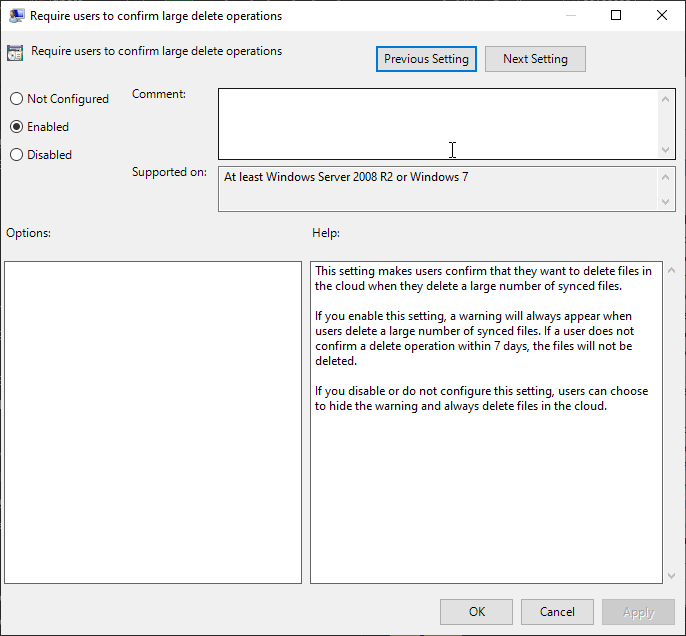 |
We have to configure the Group Policy Require users to confirm large delete operations
Then we open the registry editor |
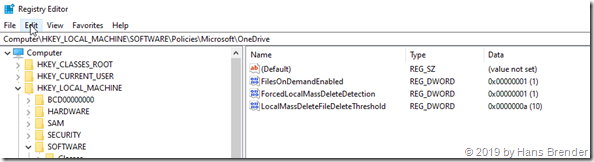
Here we have to insert the new key as mention above and then we have to insert the number. (The picture shows the number 10)
Then we have the opportunity to test the whole thing. (That’s why I only set 10 files.). Let’s create a folder and copy at least 10 files into it. The folder with all files is synchronized. Then we delete the folder.
 |
A short pop-up window appears and … you can react But in case you missed it… |
 |
You see the warning symbol in the notification area |
 |
and if you click on the OneDrive warning icon, OneDrive shows you, what you have to do. You have up to 7 days time to react
Remove The user acknowledge with a click on “Remove” and then the files will be deleted in the cloud and from all other synced devices Restore files if you click on Restore files OR if you do not react within 7 days the files are automatically restored If you have recycled your local bin, the data are restored from the cloud |
Accidental deletion is thus excluded. Of course you have to adjust the number of files to your own organizational structure (document libraries, folder structures, etc.). And, of course, it’s better to tell users not to delete the Cloud Only folder and the 60,000 files it contains. He does not take any space on the hard drive anyway.
Entdecke mehr von Hans Brender's Blog
Melde dich für ein Abonnement an, um die neuesten Beiträge per E-Mail zu erhalten.

 Hans Brender's Blog
Ein Gedanke zu “OneDrive GPO: Require users to confirm large delete operations”