

Microsoft has released in December 4 Updates for OneDrive for Business.
| KB 3114364 Office 2013 |
This update fixes the following issue: In some cases, a random number of files are deleted from SharePoint document library during synchronization. |
| KB 3085482 Office 2013 |
Fixes the following issue: When you synchronize files by using Microsoft OneDrive, the Access Denied error occurs because of invalid authorization headers. |
| KB 3085578 Office 2013 |
Fixes the following issue: When you synchronize files by using Microsoft OneDrive, the Access Denied error occurs because of invalid authorization headers. |
| KB 3114358 Office 2013 |
Fixes the following issue: When you synchronize files by using Microsoft OneDrive, the Access Denied error occurs because of invalid authorization headers. |
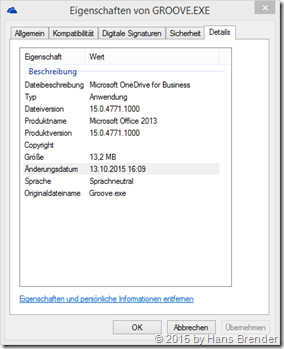
| before 12/08/15 | after 12/08/15 |
 |
 |
Be aware that the update in Download Center applies to Microsoft Installer (.msi)-based edition of Office 2013. It doesn’t apply to the Office 2013 Click-to-Run editions such as Microsoft Office 365 Home
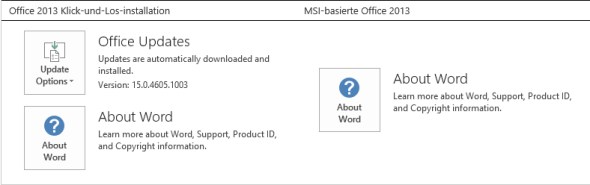
To determine whether your Office installation is Click-to-Run or MSI-based, follow these steps:
- Open an Office 2013 application, such as Microsoft Word 2013.
- On the File menu, select Account.
- For Office 2013 Click-to-Run installations, an Update Options item is displayed. For MSI-based installations, the Update Options item isn’t displayed.
it should be Version 15.0.4779.1000 or higher
Entdecke mehr von Hans Brender's Blog
Melde dich für ein Abonnement an, um die neuesten Beiträge per E-Mail zu erhalten.

 Hans Brender's Blog